Payrexx comes into play as soon as your buyer has submitted his data on your website and starts the payment.
Gateway Creation
Please read the API reference for all necessary information.
You will learn about API request basics at Payrexx and can continue with creating a Gateway.
Payload
Besides the required data, you are free to choose what you want to transfer to Payrexx. Here are some parameters that might be interesting for you:
| Parameter | Data Type | Description |
|---|---|---|
| successRedirectUrl | string | After a successful payment, a redirection to this URL is made |
| failedRedirectUrl | string | After a failed payment, a redirection to this URL is made |
| cancelRedirectUrl | string | After a cancelled payment, a redirection to this URL is made |
| pm | string[] | Restrict the available payment methods with the according identifiers |
| preAuthorization | bool | Process a tokenization payment. Find out more |
| reservation | bool | Process a pre-authorization payment. Find out more |
| referenceId | string | This can be used to assign the Payrexx transaction to an order later on |
| fields | array | Customer data goes here |
| skipResultPage | bool | Skip the Payrexx result page |
| chargeOnAuthorization | bool | Tokenization - Execute an initial charge immediately |
| validity | int | For how long should your payment gateway be available |
| subscriptionState | bool | Set to true if you want to execute subscriptions |
| subscriptionInterval | string | Subscription - Payment interval (PHP interval spec) |
| subscriptionPeriod | string | Subscription - Duration (PHP interval spec) |
| subscriptionCancellationInterval | string | Subscription - How long a cancellation is possible (PHP interval spec) |
| lookAndFeelProfile | string | If you got multiple Look & Feel profiles, decide which one to use |
All Possible Fields
- title
- forename
- surname
- company
- street
- postcode
- place
- phone
- country
- date_of_birth
- terms
- privacy_policy
- custom_field_1
- custom_field_2
- custom_field_3
- custom_field_4
- custom_field_5
Examples
- fields[forename][value]=John
- fields[lastname][value]=Doe
- fields[email][value]=john@doe.com
- fields[street][value]=Burgstrasse 20
- fields[postcode][value]=3600
- fields[place][value]=Thun
- fields[country][value]=CH
Response
After the gateway was successfully created, you will get a link in the response of your request. Redirect the shopper to this link for processing the payment.
Payment
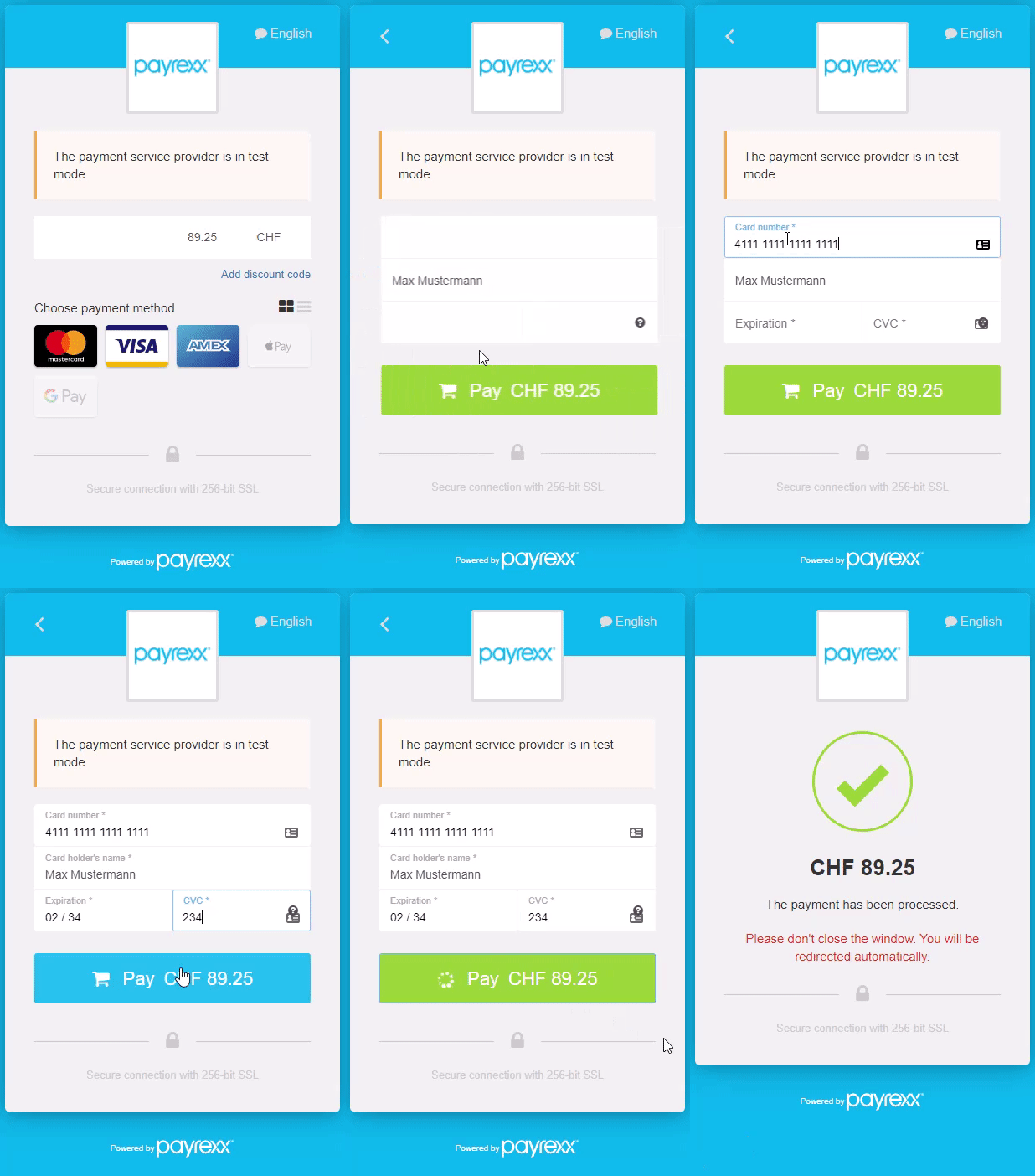
Your shopper can choose a payment method in the Gateway and process the payment:
After Payment
Depending on the payment outcome process, the shopper is redirected to the matching URL. (success-/cancel-/failedRedirectUrl)
Always use the Payrexx Webhook or API to determine a transaction status.
Next Steps
Now you have to perform further steps based on the payment result.